Migration process – RaiseNow Manager to RaiseNow Hub
Step-by-step process
To ensure an efficient migration process, the following steps must be executed in order.
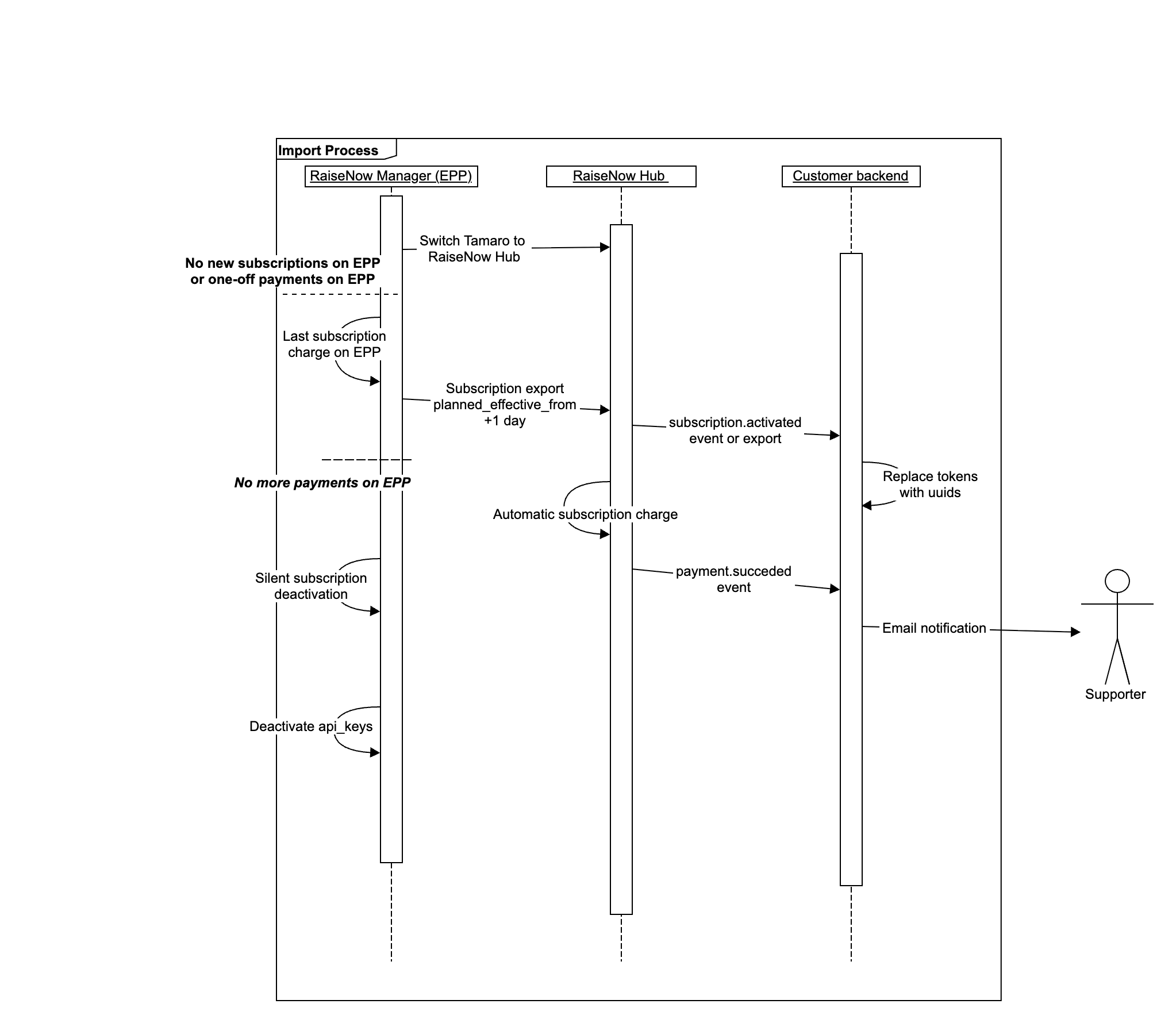
- Switch Tamaro to process new one-off and recurring card payments on RaiseNow Hub. This step is crucial to avoid generating subscriptions on the legacy RaiseNow platform after the migration has already been initiated. Subscriptions created on RaiseNow Manager after the migration process has been initiated will not be migrated to RaiseNow Hub. This means any backend integrations you may have must be ready to process one-off payments and new subscription records from RaiseNow Hub by this time. Please refer to this article for guidance on integrations.
- Execution of the migration process for card data. This migration is managed by RaiseNow and does not directly involve RaiseNow customers. It is a complex migration process that ensures data is transferred between the new systems in a PCI-compliant manner. This step is a hard prerequisite for charging imported subscriptions on RaiseNow Hub.
- Transfer of subscriptions to RaiseNow Hub. After this step, subscriptions exist both in RaiseNow Manager and in RaiseNow Hub. Subscriptions in RaiseNow Hub will have references to the legacy subscription token from RaiseNow Manager. See this section for more details. Subscriptions in RaiseNow Hub will be imported with a suspended status to avoid duplicate charges.
- Subscriptions will be deactivated on RaiseNow Manager. This will be a silent deactivation, meaning third-party systems will not be notified and emails will not be triggered.
- Exactly one day after the deactivation on RaiseNow Manager, subscriptions will be activated on RaiseNow Hub. This ensures that no duplicate charges are executed and that no planned charges are missed.
See the illustration below for a reference to the migration steps involving RaiseNow systems as well as customers’ backend integrations, either through our own RICE integration or custom API integrations.
Possible challenges customers may encounter
At this point, the majority of customers have already migrated from Manager to RaiseNow Hub. This section outlines the main causes of issues customers encountered during that process.
Duplicate processes triggered due to misinterpretation of the subscription.activated event during migration
Customers may subscribe to any events triggered by RaiseNow Hub. However, the business logic behind those endpoints is a black box to RaiseNow. Although RaiseNow processes are aligned to avoid issues such as unwanted emails caused by subscription.activated events triggered during the migration process, your endpoints may not be, which can lead to undesired behaviour. To avoid this, you can either handle this with business logic on your side or make use of filters in your event subscriptions. For example, you may filter event subscriptions based on the custom_parameters.source_identifier property to avoid receiving webhooks on a particular endpoint during the migration.
Undesired reactivation of subscriptions with a long history of failed payments
During the migration process, subscriptions will be switched to network tokens. In short, this may result in subscriptions with many failed subsequent charge attempts being unexpectedly charged successfully. This is caused by a renewed tokenisation of the original card data with the card scheme network. Please refer to this article for more details.
Performance issues with customer endpoints receiving webhooks during the migration
If you have a large number of subscriptions combined with custom event subscriptions, the defined endpoints will receive a correspondingly large number of notifications. Although RaiseNow will automatically slow down the sending (and resending) of webhooks if your system is slow to respond, this may still negatively affect your application. Mitigation strategies may involve queuing or scaling up infrastructure. However, these are decisions related to your own application and must ultimately be resolved by your own IT department or vendor.